A Google Business Profile (GBP) for doctors in Chandigarh connects private practitioners and clinics directly with patients searching across Sector 17, Sector 34, Madhya Marg, and the greater Tricity region. Proper category selection, local 0172 contact details, direct appointment links, and NMC-compliant review responses improve local 3-Pack visibility, establish medical credibility, and drive consistent OPD footfall.
Introduction
When a resident in Sector 35 wakes up with severe toothache or a parent in Sector 22 searches for an urgent pediatrician, they do not consult newspaper ads—they consult Google Maps. Having an optimized google business profile for doctors in Chandigarh is no longer a secondary branding initiative; it is the primary digital front door of your practice.
However, medical professionals across Madhya Marg and Sector 34 frequently run into verification rejections, category mismatches, duplicate listings, and compliance concerns regarding patient reviews. By leveraging dedicated local SEO services in Chandigarh, independent consultants and multispecialty clinics can establish verified authority, outrank competing facilities, and ethically convert local patient queries into confirmed clinic visits.
Local Healthcare Landscape in Chandigarh
Chandigarh’s medical environment is unique in North India. Anchored by premier tertiary institutions such as PGIMER (Sector 12) and GMCH (Sector 32), the city acts as the premier healthcare destination for Punjab, Haryana, and Himachal Pradesh. According to health demographic data published by the Chandigarh Health Department, outpatient demand across private clinics in the Tricity (Chandigarh, Mohali, and Panchkula) has surged consistently over recent years.
This influx creates an intensely competitive micro-market. Medical clusters along Madhya Marg (Sectors 8, 9, and 18) and the commercial complexes of Sector 34 and Sector 22 house hundreds of private specialists. Tricity patients search with hyper-local intent, typing terms such as “dermatologist near Piccadilly Chowk” or “pediatric clinic in Sector 35 Chandigarh.”
Furthermore, patients in this corridor transition fluidly between English, Hindi, and Punjabi. If your profile lacks local landmark tags, relies on mobile numbers rather than recognizable local landlines, or overlooks neighborhood coverage in Mohali and Panchkula, prospective patients will choose the verified practitioner down the road. Integrating comprehensive healthcare marketing strategies ensures your practice captures this regional demand.
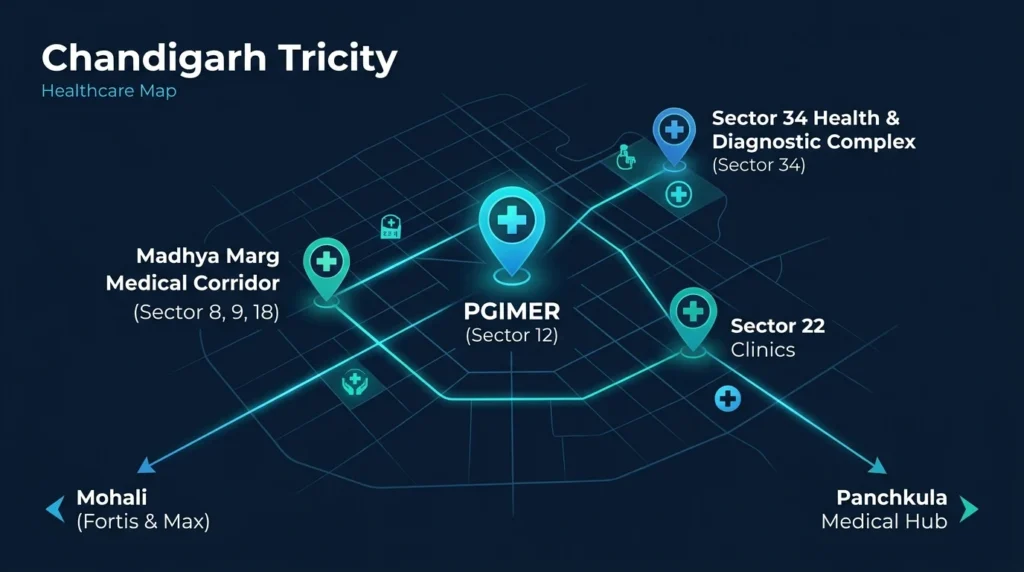
Why is Google Business Profile Crucial for Doctors in Chandigarh?
A Google Business Profile puts your practice directly into Google’s “Local 3-Pack”the top three map results displayed above standard organic listings. For medical searches, over 80% of patient decisions (phone calls, driving directions, or appointment bookings) are made directly from these three profile cards without ever clicking through to a secondary website.
Patients searching for doctors prioritize three elements: proximity, verified peer credibility, and immediate accessibility. When your profile is verified with complete operational hours, specialized consultation services, and updated photos of your clinic entrance, Google algorithms treat your listing as an authoritative local medical entity.
Following official Google Business Profile guidelines guarantees that your profile avoids algorithmic suspensions while maintaining full compliance with both local advertising standards and international search standards.
Step-by-Step GBP Setup & Verification Process
Setting up a medical profile requires more rigor than standard retail listings due to Google’s strict “Your Money or Your Life” (YMYL) quality thresholds.
Step 1: Claim or Create the Profile
Sign in to Google Business Profile Manager using an official business email associated with your clinic domain. Enter your business name exactly as registered with local authorities—avoid adding unauthorized keywords such as “Best Cardiologist”.
Step 2: Establish Address and Pinpoint Accuracy
Provide your precise clinic address including shop/booth/SCO number, floor, sector, and recognizable landmarks (e.g., SCO 142-144, Sector 34-A, Near Piccadilly Light Point, Chandigarh, 160022).
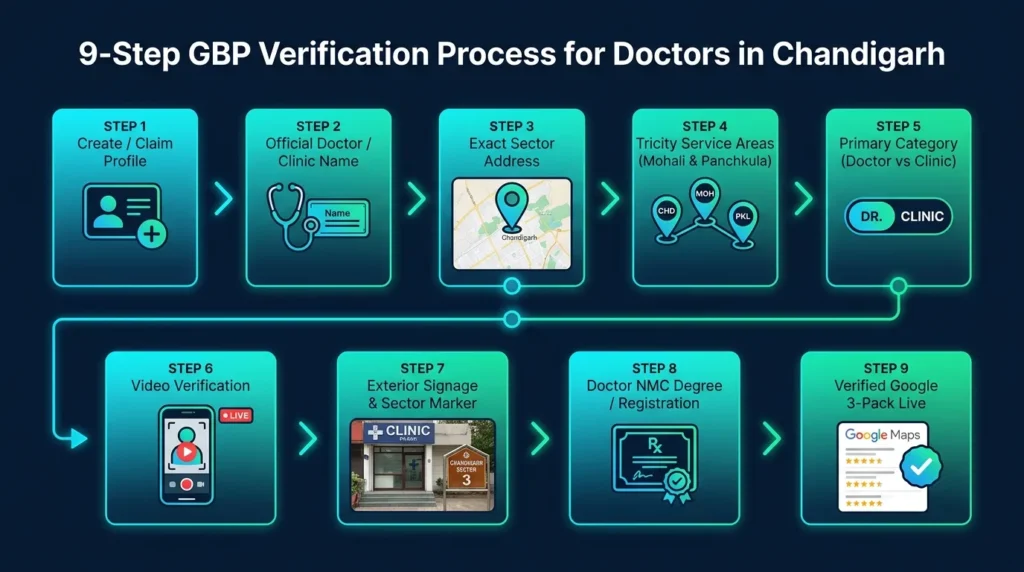
Step 3: Complete the Doctor Video Verification
Google now mandates video verification for most medical profiles in India. Prepare a 90-second continuous, unedited video showing:
- Outside signage: The exterior board displaying your clinic name, sector number, and local landmark.
- Consultation chambers: Walk through your reception, consultation desk, and diagnostic tools (stethoscope, examination bed).
- Professional credentials: Show your physical State Medical Council or National Medical Commission registration certificate mounted on the clinic wall.
- Physical access: Unlock your clinic entrance door or access the management desk to prove operational control.
Primary and Secondary Categories: Doctor vs. Clinic vs. Hospital
Choosing categories correctly is the single biggest ranking factor on Google Maps. Many medical practitioners make the fatal mistake of selecting a generic category, which prevents them from ranking for specific specialty searches.
| Entity Type | Recommended Primary Category | Approved Secondary Categories | Common Pitfall to Avoid |
|---|---|---|---|
| Individual Doctor (Solo Practice) | Specific Specialist (e.g., Orthopedic Surgeon, Pediatrician, Dermatologist) | Doctor, Medical Clinic, Consultant | Choosing “Medical Clinic” when the practice is branded around a single practitioner. |
| Multispecialty Private Clinic | Medical Clinic or Polyclinic | Doctor, Diagnostic Center, Health Consultant | Omitting sub-specialties under secondary categories. |
| Dental Specialty Center | Dentist or Dental Clinic | Cosmetic Dentist, Orthodontist, Teeth Whitening Service | Using “Medical Clinic” instead of dental-specific categories. |
| Day Care / Nursing Home | Hospital or Specialized Hospital | Surgical Center, Emergency Care Service, Maternity Center | Claiming “Hospital” status without 24/7 emergency facilities. |
According to sector insights from the IBEF Healthcare Industry Report, organized private healthcare delivery is transitioning toward specialized boutique clinics. Aligning your Google categories precisely with your clinical specialty ensures search engines match your profile with relevant, high-conversion patient inquiries.
Services, Accessibility Attributes, and Appointment URL Integration
1. Custom Service Menus
Avoid listing bare specializations. Add comprehensive service entries under your primary category:
- Service Name: Knee Replacement Consultation / Arthroscopy
- Description: Specialized joint care and pre-surgical evaluations for osteoarthritic patients in Chandigarh and surrounding Tricity areas.
- Pricing: Explicit pricing is optional, but mentioning “Transparent OPD Consultation Fee” increases patient trust.
2. Sector-Specific Accessibility Attributes
Chandigarh’s commercial sectors have distinct infrastructure profiles. Mark the following attributes within your GBP dashboard:
- Wheelchair accessible entrance, elevator, and seating: Crucial for senior citizens visiting Sector 17 and Sector 34 SCO complexes.
- Parking availability: Detail whether your clinic offers dedicated basement parking, open municipal parking, or valet assistance.
3. Direct Appointment URL
Integrate a functional, direct booking link pointing to your appointment scheduler rather than your generic homepage. Ensure the landing page loads rapidly on mobile devices.
4. Localized Bilingual Clinic Description Example
Google’s semantic engine indexes descriptions for contextual queries. Below is an optimized template tailored for Chandigarh doctors:
“Dr. Aggarwal Clinic provides advanced orthopedic and sports injury care in Sector 34-A, Chandigarh (Opposite Gurudwara, near Piccadilly Chowk). Serving patients across Chandigarh, Mohali, and Panchkula, our clinic offers digital X-ray diagnostics, joint pain therapy, and knee replacement consultations. हमारे क्लिनिक में जोड़ों के दर्द, आर्थराइटिस और स्पोर्ट्स इंजरी का आधुनिक इलाज उपलब्ध है। Call 0172-XXXXXXX to book your consultation with our experienced orthopedist.”
Weekly Updates, Posts, and Q&A Management
A static Google Business Profile quickly loses rankings to active competitors. Deploying consistent, educational updates signals to Google that your practice is active and authoritative.
- Weekly Health Advice Posts: Share seasonal advisories (e.g., dengue prevention during monsoon in Chandigarh, smog protection in winter months). Never post exaggerated cure guarantees.
- Holiday Timings & Changes: Update your profile hours prior to national holidays or local celebrations. Outdated operational hours that lead to patients visiting a closed clinic result in immediate 1-star reviews.
- Proactive Q&A Seeding: Patients often have identical administrative questions. Pre-populate your Q&A section with clear answers:
- Q: Is parking available near the Sector 34 clinic?
A: Yes, ample municipal parking is available directly in front of SCO 142, with wheelchair ramp access at the main entry. - Q: Do you accept emergency trauma cases on Sundays?
A: Our OPD operates Monday through Saturday from 10:00 AM to 7:00 PM. For emergency trauma on Sundays, please visit the emergency wing at GMCH Sector 32.
- Q: Is parking available near the Sector 34 clinic?
For a deeper dive into managing patient relationships online, read our comprehensive guide on patient review management strategies.
Real-World Case Study: Sector 34-A Clinic Turnaround
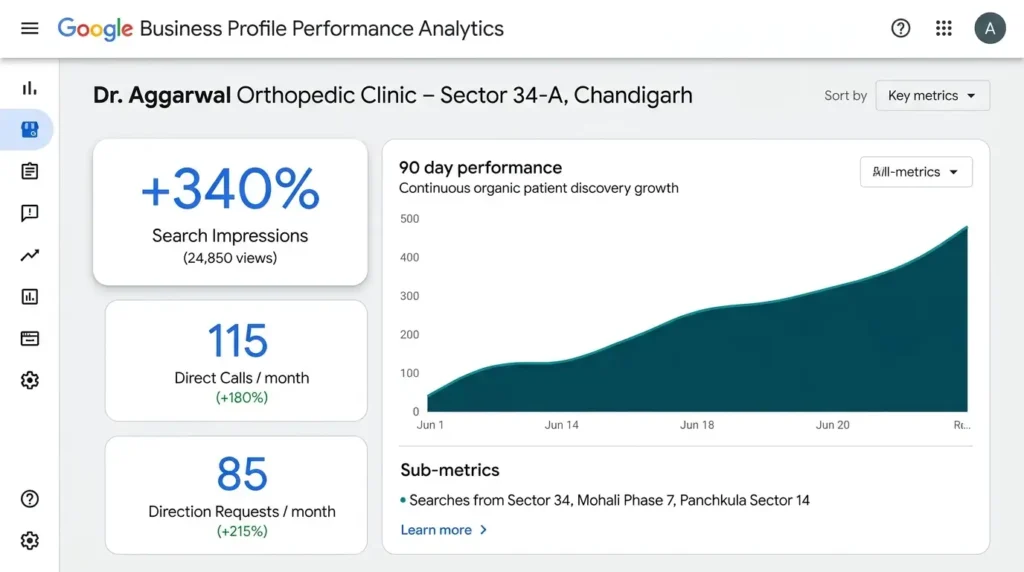
Practice Profile
Dr. Aggarwal’s Orthopedic & Joint Care Clinic (Sector 34-A, Chandigarh).
Initial Challenges: Unverified listing, listed under generic category “Doctor”, zero appointment clicks, phone inquiries under 10 calls per month.
Action Plan Implemented (90-Day Sprint)
- Re-verified profile via continuous clinic walkthrough video showing degrees and Sector 34 municipal markers.
- Switched primary category from generic Doctor to Orthopedic Surgeon, with secondary categories Sports Medicine Clinic and Joint Replacement Clinic.
- Added 0172 landline alongside verified mobile WhatsApp appointment routing.
- Added 24 high-resolution photos of the clinic reception, sterilized examination rooms, and parking zones.
- Deployed compliant review collection protocol and answered 15 local patient Q&As.
Results
- Map Views: Increased from 1,200 to 5,280 monthly impressions (+340%).
- Direct Inbound Calls: Grew from 8 calls/month to 115 confirmed inquiries/month.
- Direction Requests: 85 monthly direction requests originating specifically from Mohali (Phases 3B2, 7) and Panchkula (Sectors 4, 5).
Ethical & NMC-Compliant Review Management (+ Templates)
The National Medical Commission (NMC) enforces strict standards regarding medical ethics and advertising. Under NMC regulations, registered medical practitioners cannot pay for reviews, publish testimonials that make unrealistic claims, or use commercial advertising gimmicks. Furthermore, responding to reviews requires absolute confidentiality regarding patient health data.
Compliant Review Response Principles:
- Never confirm or deny that the reviewer underwent a specific medical procedure.
- Maintain an empathetic, professional tone regardless of provocation.
- Move dispute resolution off public forums immediately.
Template 1: Responding to a Positive Review
“Thank you for your kind words. Our team at [Clinic Name], Sector 34 Chandigarh, is dedicated to providing compassionate, transparent care to all our patients. We appreciate your trust in our services.”
Template 2: Responding to a Critical / Negative Review
“Hello. At [Clinic Name], we take patient feedback and clinical care standards very seriously. Due to medical confidentiality protocols, we cannot discuss individual patient details on a public platform. Please reach out to our clinic administrator directly at 0172-XXXXXXX or email care@yourclinic.com so we can investigate and address your concern promptly.”
Template 3: Responding to a Service Delay or Wait-Time Concern
“Thank you for sharing your feedback. While we strive to maintain punctual appointment schedules, emergency medical consultations can occasionally cause unavoidable delays. We appreciate your patience and are continuously optimizing our OPD scheduling to serve our Tricity patients better.”
7 Critical GBP Mistakes Doctors in Chandigarh Make
- Keyword Stuffing the Clinic Name: Naming your profile “Dr. Verma – Best Cardiologist in Chandigarh Top Heart Doctor” violates Google’s terms and triggers immediate suspensions. Stick strictly to your legal trade or practitioner name.
- Ignoring Practitioner vs. Practice Separation: Operating a multi-doctor clinic under a single individual practitioner listing confuses Google’s entity graph. Create one primary clinic profile, then link independent doctor profiles to that location.
- Soliciting Incentivized or Bulk Reviews: Offering discounts in exchange for 5-star ratings violates NMC ethics and Google’s review policies, risking total listing removal.
- Disclosing Patient Conditions in Responses: Writing “We are glad your fracture healed quickly” on a public review publicly reveals protected health information.
- Omitting Local 0172 Landline Numbers: Using only personal mobile numbers harms local credibility. A local Chandigarh landline establishes authentic local residency.
- Leaving “Suggested Edits” Unmonitored: Competitors or automated bots can suggest modifications to your timings or address. Check your dashboard weekly to reject unauthorized edits.
- Neglecting Mohali and Panchkula in Service Areas: If you operate in Sector 34 or Madhya Marg, failing to designate Mohali and Panchkula as primary service areas cuts off 40% of your regional patient base.
10-Point GBP Action Plan & Verification Checklist
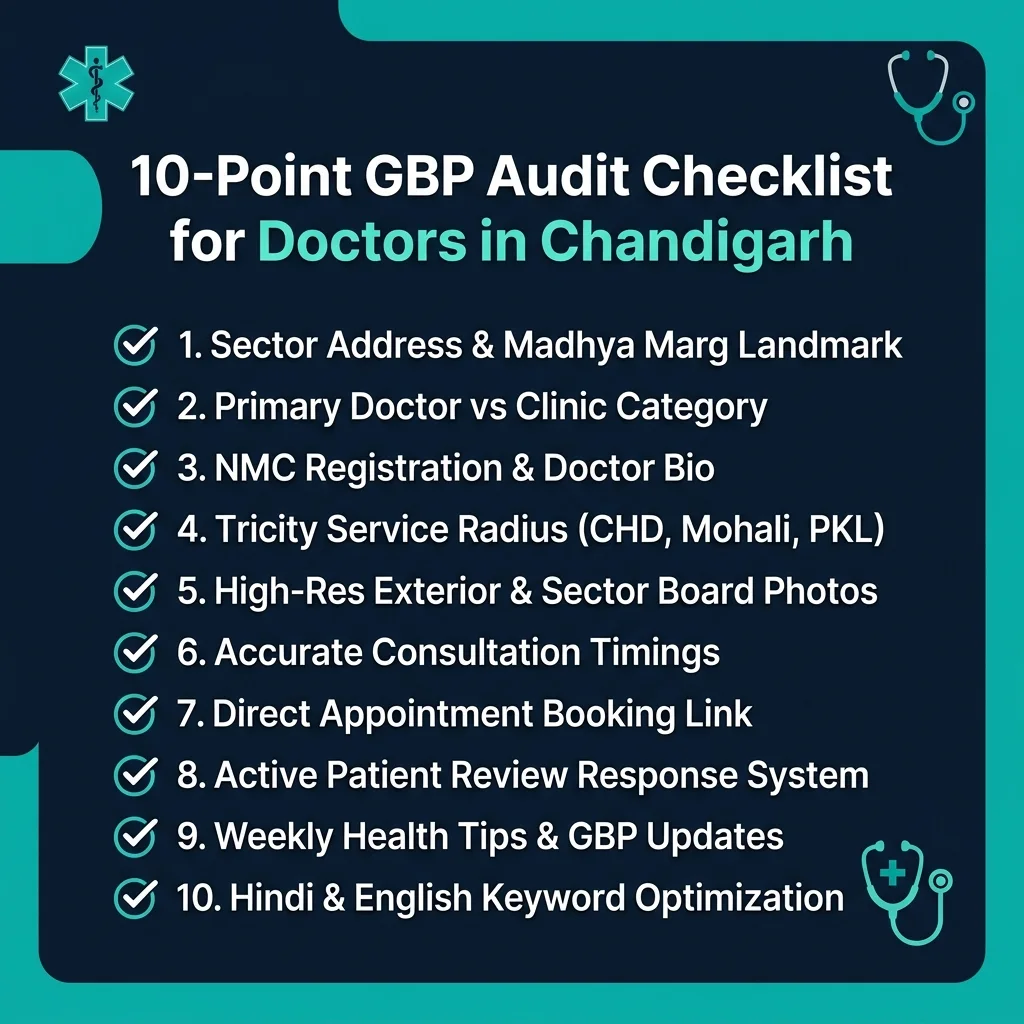
Follow this prioritized checklist to audit your medical profile today:
| Step # | Action Item | Target Completion | Verification Status |
|---|---|---|---|
| 1 | Match legal clinic name exactly with registration board | Day 1 | [ ] |
| 2 | Add physical address with sector, booth/SCO, and landmark | Day 1 | [ ] |
| 3 | Input Chandigarh 0172 landline alongside mobile contact | Day 2 | [ ] |
| 4 | Define primary medical category based on exact specialization | Day 2 | [ ] |
| 5 | Complete video walkthrough verification | Day 3 | [ ] |
| 6 | Integrate appointment URL using Google Rich Results Test verified schema | Day 4 | [ ] |
| 7 | Populate 10 core medical services with descriptions | Day 5 | [ ] |
| 8 | Upload 15 high-res, geo-tagged photos of clinic & facilities | Day 6 | [ ] |
| 9 | Add bilingual clinic description with local landmark references | Day 7 | [ ] |
| 10 | Partner with experienced local SEO services in Chandigarh for ongoing growth | Day 7 | [ ] |
Frequently Asked Questions
1. Can a doctor practicing in Sector 34 Chandigarh have both a personal and clinic profile?
Yes. Google explicitly permits individual medical practitioners to maintain their own verified practitioner profile while associating with a verified clinic or hospital listing. However, each listing must have unique categories and distinct landing pages on your website to prevent duplicate profile flags.
2. How should a Chandigarh clinic configure its service areas if patients visit from Mohali and Panchkula?
While your physical address must remain your verified clinic location in Chandigarh, you can specify up to 20 service areas within your GBP dashboard. Add specific sectors across Chandigarh, SAS Nagar (Mohali), Panchkula, and Zirakpur to signal your regional reach to Google Maps.
3. How can doctors in Chandigarh verify their profile without waiting for a postcard?
Google now predominantly offers Video Verification for healthcare providers. By submitting a continuous video displaying your clinic’s exterior signage, sector road sign, reception, and medical registration certificate, you can achieve verification within 3 to 5 business days without postal delays.
4. Are doctors legally allowed to ask patients for Google reviews under NMC rules?
Doctors may display a clean QR code at their reception desk inviting patients to share honest feedback. However, offering financial incentives, discounts, running paid review campaigns, or advertising testimonials promising guaranteed clinical outcomes violates National Medical Commission ethical guidelines.
5. What should a doctor do if they receive a fake or defamatory 1-star review?
Do not engage in emotional arguments. Post a calm, professional response stating that your records show no patient under that name and inviting them to contact clinic administration. Then, flag the review via Google Business Profile Manager under “Conflict of Interest” or “Offensive Content” for removal.
Conclusion
A well-optimized Google Business Profile bridges the gap between your clinical expertise and patients seeking reliable, timely care across Chandigarh, Mohali, and Panchkula. By establishing verified medical categories, maintaining operational accuracy, setting up direct appointment booking channels, and responding to reviews with strict ethical compliance, your clinic builds lasting digital authority.
Take control of your online clinical presence today. Audit your profile against our 10-point checklist, or collaborate directly with our dedicated team of medical marketing specialists at Raiseque local SEhttps://raiseque.in/chandigarh/local-seo-services/ services in Chandigarh to dominate your local medical search landscape.